Reproducible Workflows

EDS 214: Analytical Workflows and Scientific Reproducibility


Day 1 Morning | August 24th, 2026

Welcome back!


Over the last two weeks in EDS 221, you learned foundational concepts and tools for writing code


This week in EDS 214, you’ll learn how to 🤖 automate, 🗂 organize, and 📝 document your code, to better 🤝 collaborate in teams

Workflows and Reproducibility


This is a class about workflows and reproducibility


The workflow is the fundamental unit of data science


Reproducibility ensures workflows don’t become dead ends


The concepts and skills in this class will keep coming up in future classes and for the rest of your career

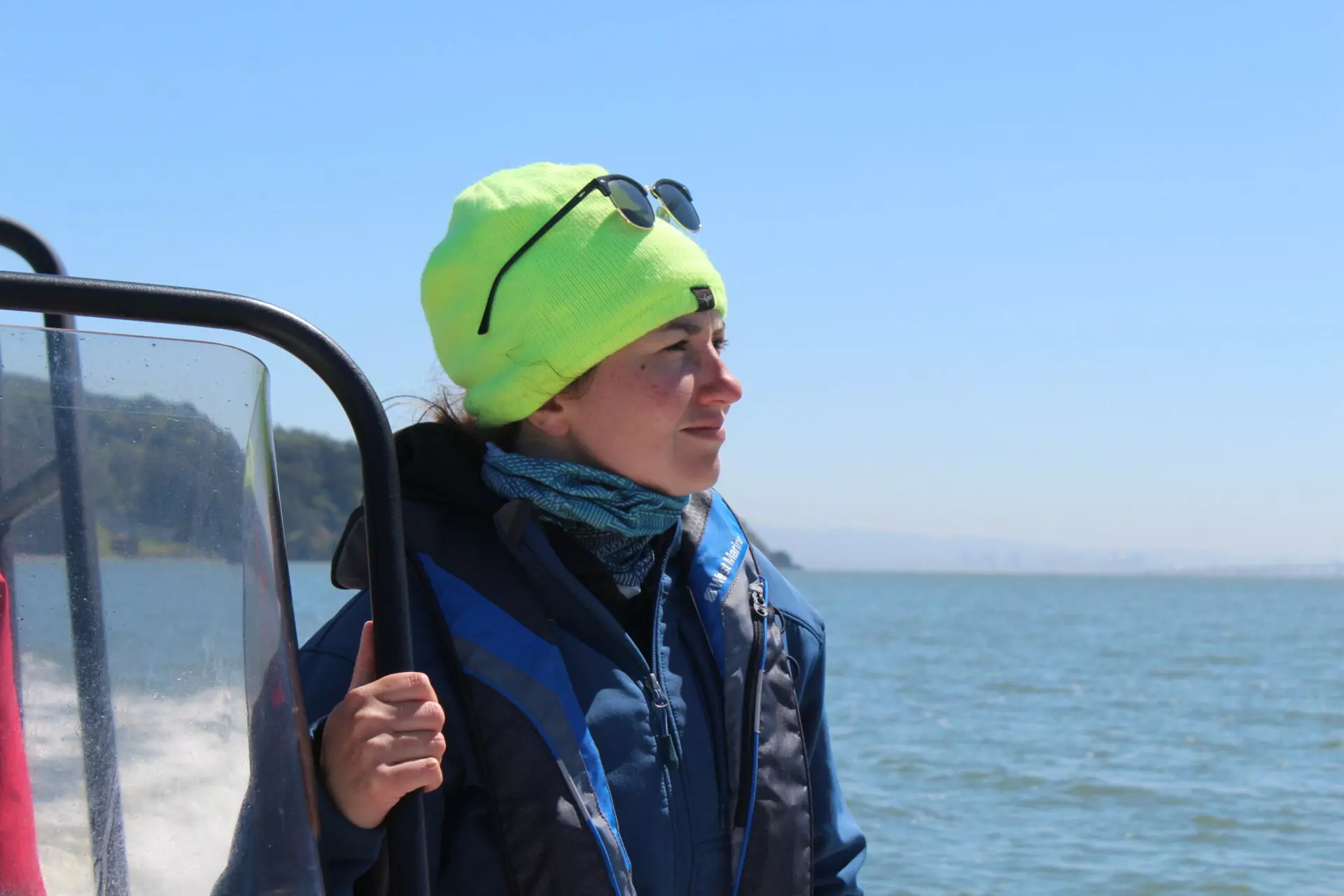
“Reproducible workflows saved my life <3”


Bekah Lane headshot

Bekah Lane

Research Associate, Center for Coastal Studies

Question: Where are humpbacks in SF Bay most susceptible to ship strikes?

Problem: Manual, point-and-click solution in ArcGIS is error-prone, slow, and a nightmare to edit with collaborator feedback.

What would you do?

What is a workflow?


THINK Take 1 minute to think of a time you performed an analysis. What did your workflow look like?

  • What were you analyzing?
  • Who was the audience for your analysis? Who were your collaborators?
  • What challenges did you encounter sharing data, code, or results?

PAIR Turn to your neighbor and discuss your experiences. Identify at least one shared element of your experiences, and at least one differing.

SHARE I will randomly call on a pair to share.

What is a workflow?


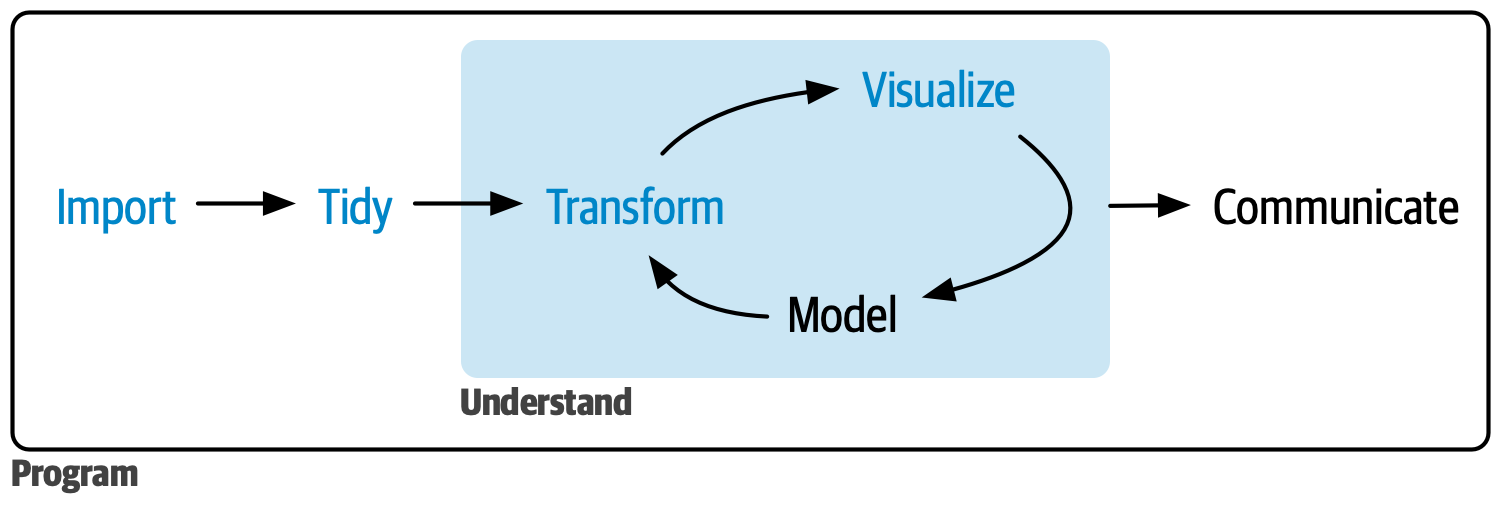
Workflows combine: data, code, modeling, and communication.

Components of a workflow

Wickham, Çetinkaya-Rundel, and Grolemund (2023)

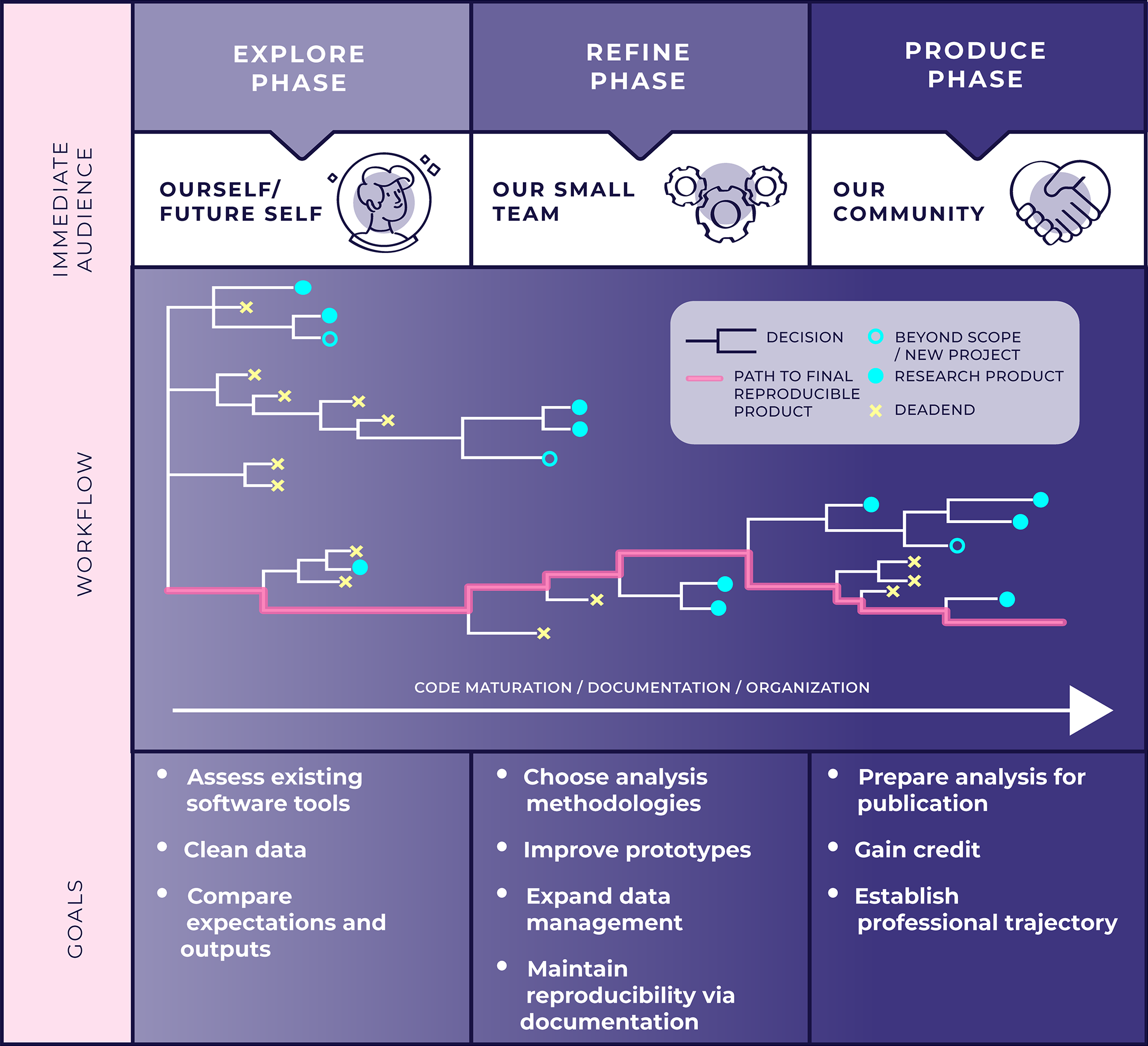
The final workflow masks a trajectory of exploration and dead ends

The evolution of a workflow

Stoudt, Vásquez, and Martinez (2021)

What is reproducibility?


We define reproducibility to mean computational reproducibility — obtaining consistent computational results using the same input data, computational steps, methods, code, and conditions of analysis

Reproducibility and Replicability in Science (2019)

DEBATE With your neighbor, discuss: does reproducibility matter if you’re not doing academic research?

  • What if you work for a public utility, a non-governmental organization, or a private firm?
  • Articulate one argument for and against the importance of reproducibility.
  • I will randomly call on a pair to share.

Global and local goals


Reproducibility is

GLOBAL GOAL

… a means to verify results and ensure scientific integrity

LOCAL GOAL

… a mechanism for knowledge transfer and collaboration

Feinberg et al. (2020)

How does class work?


Reproduce a workflow (starting today!)

Lectures and interactive activities for learning goals

  • 🤖 Automation
  • 🗂 Organization
  • 📝 Documentation
  • 🤝 Collaboration

Syllabus


Take 5 minutes to look at the course syllabus.

What are the requirements for an A?

Do you have any questions?

Specification-based grading


  • No points out of 100
  • A rubric of specifications (specs) for your final project
  • Meet specs and participate in class - get an A


Feedback loops are critical (no one-and-done)


You’ll see more spec-based grading in other MEDS classes

Course schedule


Day AM PM
Monday Lecture: Reproducible workflows
Interactive: Plan an analysis
Lecture: Workflow organization
Interactive: Make spaghetti
Tuesday Lecture: Command line and remote server
Interactive: Navigate the server
Lecture: Documentation
Interactive: READMEs, comments, and style
Wednesday Lecture: Version control with git
Interactive: git branching
Lecture: Collaboration with GitHub
Interactive: Refactor a function
Thursday Lecture: Draft Quarto analysis
Interactive: Self assessment
Lecture: Peer feedback and contributions
Interactive: Open work time
Friday Lecture: Meet your next instructor
Interactive: Final project submission
Lecture: Instructor feedback
Interactive: Project wrap-up
  • Introduction to workflows and reproducibility
  • Begin working on your final project!

Course schedule


Day AM PM
Monday Lecture: Reproducible workflows
Interactive: Plan an analysis
Lecture: Workflow organization
Interactive: Make spaghetti
Tuesday Lecture: Command line and remote server
Interactive: Navigate the server
Lecture: Documentation
Interactive: READMEs, comments, and style
Wednesday Lecture: Version control with git
Interactive: git branching
Lecture: Collaboration with GitHub
Interactive: Refactor a function
Thursday Lecture: Draft Quarto analysis
Interactive: Self assessment
Lecture: Peer feedback and contributions
Interactive: Open work time
Friday Lecture: Meet your next instructor
Interactive: Final project submission
Lecture: Instructor feedback
Interactive: Project wrap-up
  • Command line interfaces, remote server (Workbench)
  • Documentation - purpose, audience, flavors

Course schedule


Day AM PM
Monday Lecture: Reproducible workflows
Interactive: Plan an analysis
Lecture: Workflow organization
Interactive: Make spaghetti
Tuesday Lecture: Command line and remote server
Interactive: Navigate the server
Lecture: Documentation
Interactive: READMEs, comments, and style
Wednesday Lecture: Version control with git
Interactive: git branching
Lecture: Collaboration with GitHub
Interactive: Refactor a function
Thursday Lecture: Draft Quarto analysis
Interactive: Self assessment
Lecture: Peer feedback and contributions
Interactive: Open work time
Friday Lecture: Meet your next instructor
Interactive: Final project submission
Lecture: Instructor feedback
Interactive: Project wrap-up
  • Advanced git and GitHub functionality for collaboration
  • Apply what you’ve learned to your final project

Course schedule


Day AM PM
Monday Lecture: Reproducible workflows
Interactive: Plan an analysis
Lecture: Workflow organization
Interactive: Make spaghetti
Tuesday Lecture: Command line and remote server
Interactive: Navigate the server
Lecture: Documentation
Interactive: READMEs, comments, and style
Wednesday Lecture: Version control with git
Interactive: git branching
Lecture: Collaboration with GitHub
Interactive: Refactor a function
Thursday Lecture: Draft Quarto analysis
Interactive: Self assessment
Lecture: Peer feedback and contributions
Interactive: Open work time
Friday Lecture: Meet your next instructor
Interactive: Final project submission
Lecture: Instructor feedback
Interactive: Project wrap-up
  • Final project drafts completed
  • Self assessment and peer feedback

Course schedule


Day AM PM
Monday Lecture: Reproducible workflows
Interactive: Plan an analysis
Lecture: Workflow organization
Interactive: Make spaghetti
Tuesday Lecture: Command line and remote server
Interactive: Navigate the server
Lecture: Documentation
Interactive: READMEs, comments, and style
Wednesday Lecture: Version control with git
Interactive: git branching
Lecture: Collaboration with GitHub
Interactive: Refactor a function
Thursday Lecture: Draft Quarto analysis
Interactive: Self assessment
Lecture: Peer feedback and contributions
Interactive: Open work time
Friday Lecture: Meet your next instructor
Interactive: Final project submission
Lecture: Instructor feedback
Interactive: Project wrap-up
  • Final project submission and instructor feedback
  • Course wrap up

“Reproducible workflows saved my life <3”


Bekah Lane headshot

Bekah Lane

Research Associate, Center for Coastal Studies

Question: Where are humpbacks in SF Bay most susceptible to ship strikes?

Problem: Manual, point-and-click solution in ArcGIS is error-prone, slow, and a nightmare to edit with collaborator feedback.

Any new ideas?

“Reproducible workflows saved my life <3”


Bekah Lane headshot

Bekah Lane

Research Associate, Center for Coastal Studies

“It takes more activation energy to ‘do it right’, but you save yourself loads of time relative to doing it by brute force.”

“In my current job I’m often asked to do similar analyses for multiple projects. I can save a lot of time by recycling code between projects.”

“Collaboration and communication become a lot easier when you have your workflow laid out and organized instead of all jumbled in your brain.”

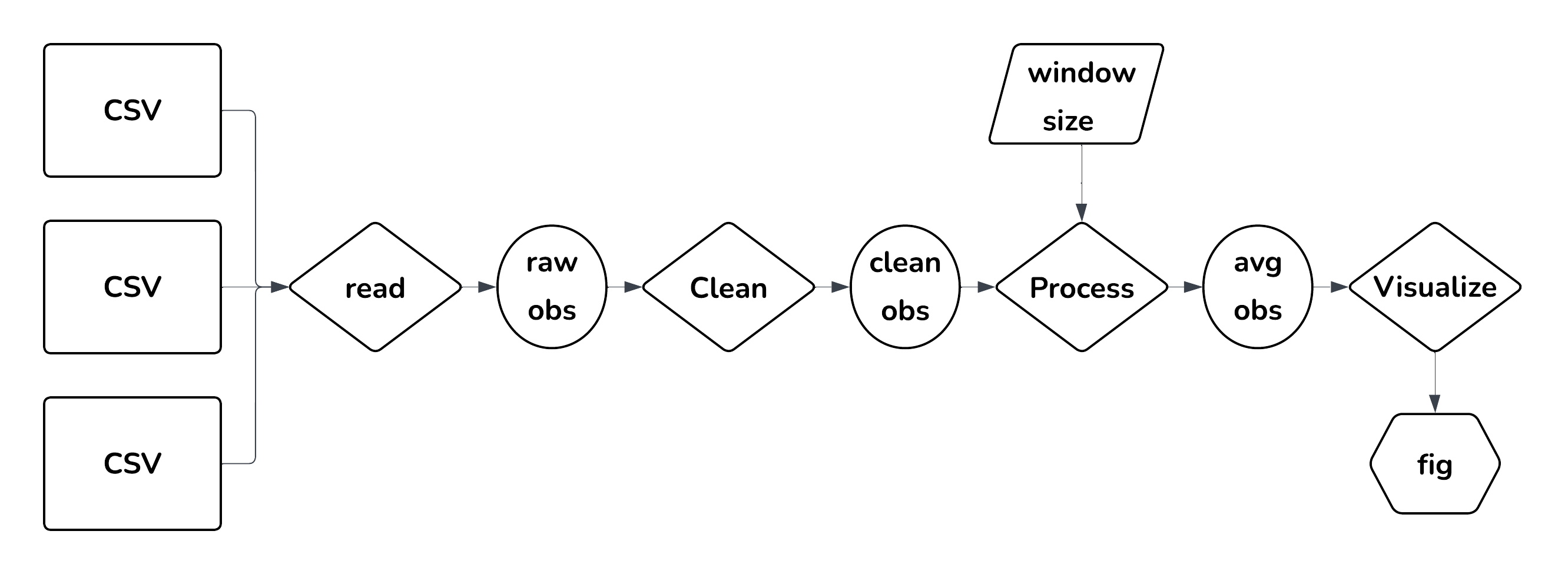
Flowchart best practices


Which is quicker to understand?

1. Read in the data
  - There are three CSV files in the data/ folder
  
2. Clean the data
  - Convert date to YYYY-MM-DD using as.Date()
  
3. Process the measurements
  - The units are all consistent, but the temporal sampling isn't
  
4. Visualize the results
  - I think the data frame needs to be pivoted from wide to long

Flowchart best practices


Do:

  • Use visuals
  • Keep it simple
  • Use consistent shapes

Why?

  • Visual processing is fast
  • Visual memory is strong
  • Identify structures and errors

Flowchart best practices


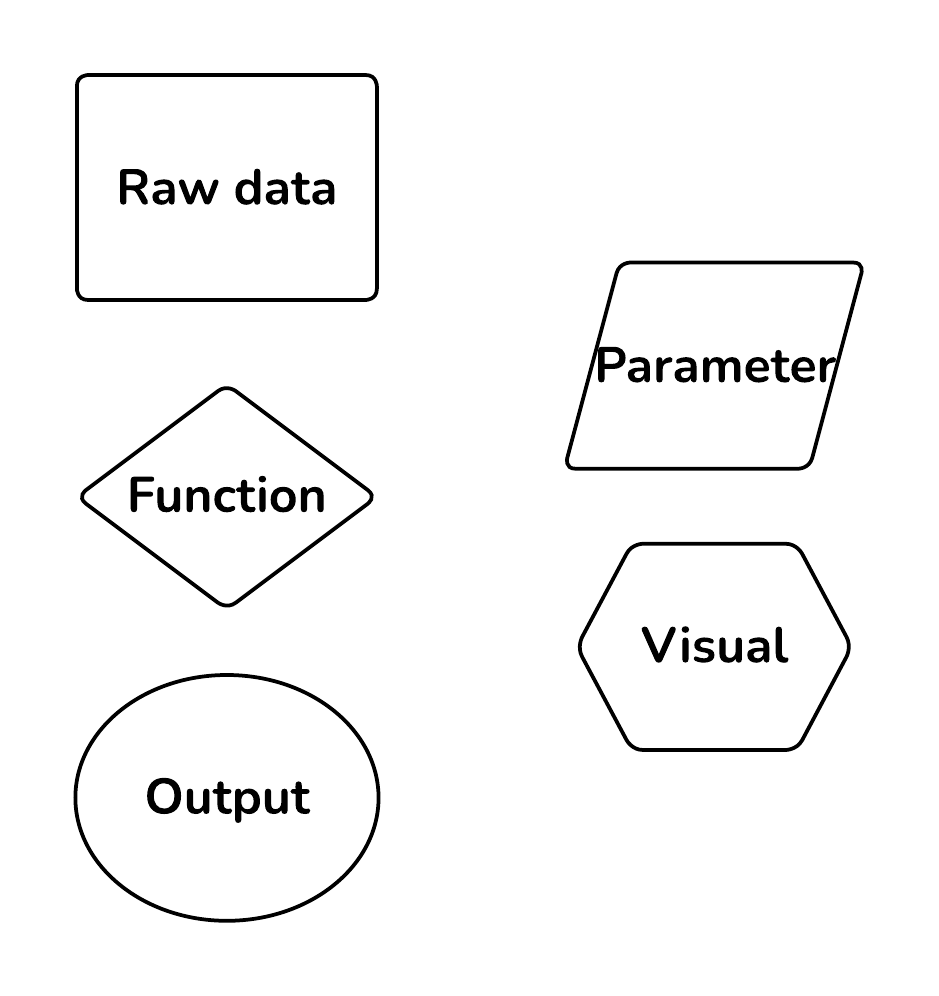
My system:

Use your own!

Consistency is what matters
Works cited

Feinberg, Melanie, Will Sutherland, Sarah Beth Nelson, Mohammad Hossein Jarrahi, and Arcot Rajasekar. 2020. “The New Reality of Reproducibility: The Role of Data Work in Scientific Research.” Proceedings of the ACM on Human-Computer Interaction 4 (CSCW1): 1–22. https://doi.org/10.1145/3392840.
Reproducibility and Replicability in Science. 2019. National Academies Press. https://doi.org/10.17226/25303.
Stoudt, Sara, Váleri N. Vásquez, and Ciera C. Martinez. 2021. “Principles for Data Analysis Workflows.” Edited by Patricia M. Palagi. PLOS Computational Biology 17 (3): e1008770. https://doi.org/10.1371/journal.pcbi.1008770.
Wickham, Hadley, Mine Çetinkaya-Rundel, and Garrett Grolemund. 2023. R for Data Science: Import, Tidy, Transform, Visualize, and Model Data. 2nd ed. Sebastopol, CA: O’Reilly Media. https://r4ds.hadley.nz/.